Music you do not own yet
Everything else Stellody does is about the music already on your disk. This is the opposite question: given what you have collected, what is worth reaching for next. Tick the genres worth looking in and Stellody asks two public music catalogues what those artists released that you do not hold, along with who else sounds like them.
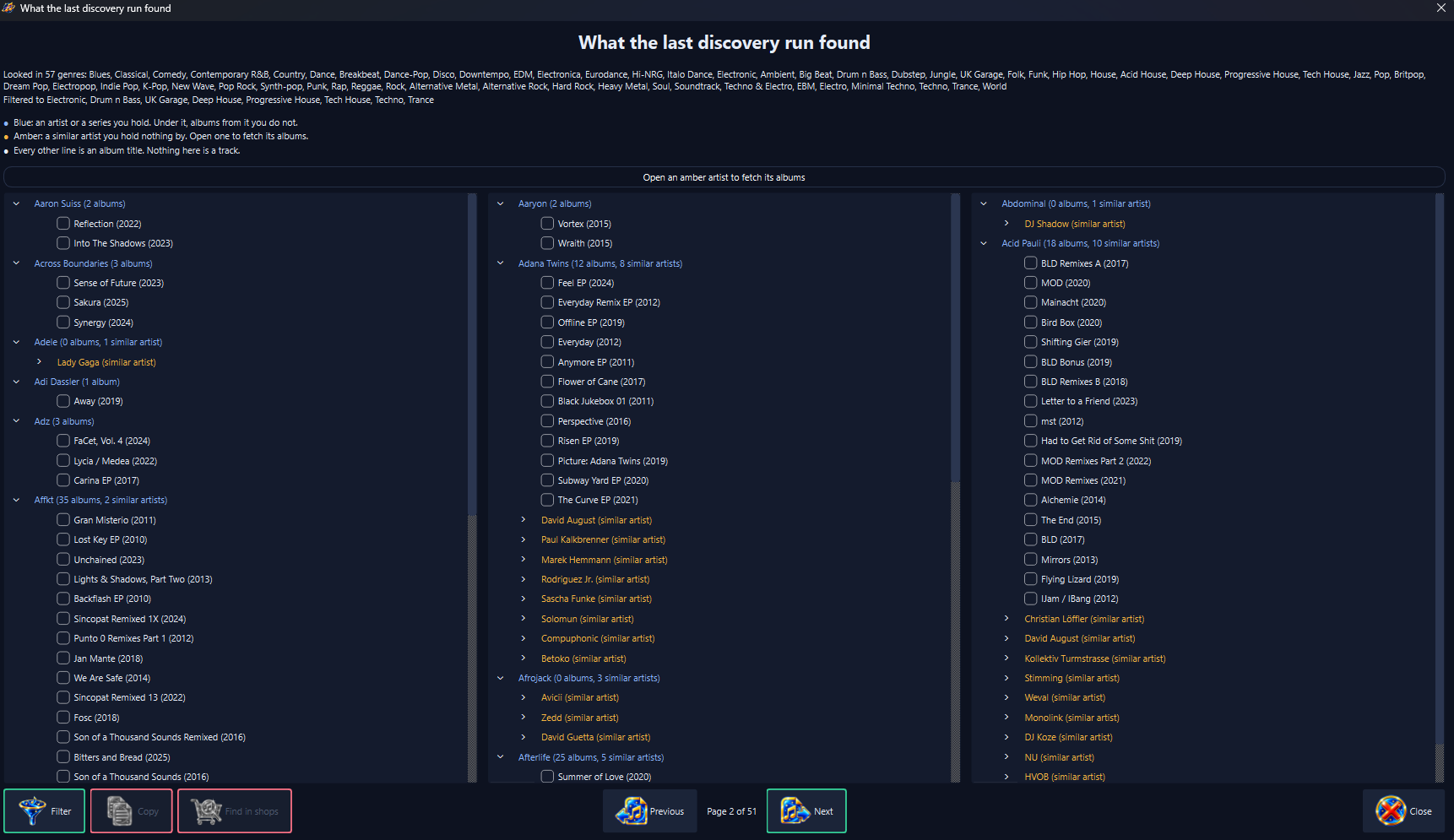
What the search found, turned a page at a time. Blue is an artist or a series you hold; amber is an artist you do not. Every line says which it is in words. Each album carries the year it first came out.
You choose what it looks at
The genres you tick decide which of your artists are named, so what goes out is a subset you chose rather than an inventory of everything you own. What goes out is those artist names; up to three album or track titles you hold under a name several artists share, to tell which one you mean; while compilations are included, the titles of those compilations and the series names read from them; the identifiers the catalogue gives back for all of these and for the similar artists it suggests; the fixed settings each request states for itself plus a user agent naming Stellody, its version and the project's contact address. The language asked for is fixed at any rather than your computer's own: no collection, no counts, nothing about you or your machine.
Compilations, if you want them
A compilation filed under Various Artists is one name that means nobody, so by default it adds nothing. Tick the box for compilations and the search asks about the artists on their tracks instead, still only in the genres you ticked; a line beneath the box says how many of those artists and series have never been looked up and roughly how many minutes they add.
A ticked box also finds the other volumes of each series you hold. Hold Global Underground: Adapt #2 and #6; the answer offers the four you are missing under a heading of their own, marked as a series. The series comes from MusicBrainz, topped up by albums whose title differs only by the volume number, which also covers a compilation in no series and volumes newer than the series list. An album filed under a name that only labels a series, as Global Underground does, is treated the same way. Nothing you already hold is offered back, whoever it is filed under.
A name holding several artists, such as a compilation credit or the name an album is filed under, is looked up whole first; each artist in it is looked up only if nobody answers to the whole.
From the years you choose
Two optional fields, released from and to, limit what a search offers to music from those years: after a year, before one, between two or any. They decide what comes back, never what is learned from, so a 1977 album on your shelf can still lead to a record released last year.
A record counts from the year it first came out, so a new reissue of an old album is old. One whose year the catalogue does not state is left out while years are set. A similar artist is offered only if they released something inside them.
It says how it is getting on
A search takes minutes, because the catalogues ask to be questioned slowly and Stellody keeps to that. Two bars in the toolbar show how far it has got: the first while your own artists are looked up, the second while the similar artists are checked for style (then, when years are set, for when they released). Hovering names who is being asked about; the time remaining is written both on the bar and along the foot of the window.
Stop means stop
While a search runs, the button that started it wears a cross and offers to stop it. One press ends it there and then, with nothing to confirm: the request already in flight is dropped rather than waited out.
What it found, read plainly
Artists you hold are shown in one colour with the albums by them you do not underneath; artists you hold nothing by are shown in another; opening one fetches its records then. Every line also says in words which kind it is, so the colours are never carrying the meaning alone. Each album carries the year it first came out beside its title.
A page at a time, up to three columns wide
A whole library answers with hundreds of artists, which is more list than anybody reads. The answer is dealt across the width of the screen and turned a page at a time, with two controls under it saying which page of how many you are on; the direction that leads nowhere wears its own picture struck through.
Albums you tick stay ticked as you turn the pages, so what goes to a shop is everything you picked out wherever you picked it.
Narrow a long answer by genre
A search over a whole library can answer with thousands of albums. A Filter button under the answer offers the genres that search looked in; tick some and the pages are dealt again from what is left. An artist you hold stays where one of your own albums by them sits under a picked genre.
A similar artist stays where an earlier search recorded what they play, counting only the genres they mostly play: a few votes on MusicBrainz calling a pop singer electronic do not put her under Electronic. One MusicBrainz says nothing about is judged by the artist you hold it was suggested for. It is held back only where neither gives a genre, with a line saying how many. Filtering never takes a tick away, while Copy and Find in shops act only on the ticked albums you can see.
A search always shows you what it found
One artist a catalogue would not discuss no longer costs you the rest: what could not be answered for is written down beside what was; the screen opens either way, saying how many artists are missing from it.
Every answer is kept the moment it arrives too, so a search stopped, interrupted or cut off by the machine going down loses nothing it had already paid for. Running it again asks only for what is still missing, which is why a second attempt is quick.
It never offers you what you already have
A remaster of a record you own is the same record, so it is not a gap; a live album of the same name is a different one, so it is. That rule was worked out against a real collection rather than assumed; the edition wording rippers leave in titles is stripped from both sides before anything is compared.
One name, several artists
Where the catalogue holds more than one artist under a name in your collection, Stellody asks who is credited on an album or a track you hold under that name. The one credited there is yours; it never picks one on a guess. A name typed without its accents still finds the artist.
It says who it could not answer for
Some questions come back with nothing usable: the catalogue is having a bad moment; it holds nobody under a name; it holds several artists under one and none of your records says which is yours.
Each kind is counted separately at the end of a search, since one is worth trying again later and one is a spelling worth a look. A button beside that count opens the names themselves. Without it, an answer that had missed a third of your collection would read exactly like a complete one.
Then to a shop, if you want one
Tick the albums you want and choose a shop: your browser opens that shop's own search for each one. Stellody has no affiliation with any of them, no arrangement and no referral; it takes nothing from a sale and sells nothing itself. Copy puts the ticked albums on the clipboard for anywhere else.
Closing the shops screen clears every tick, including one under an artist rolled up or held back by a filter, so the next round starts from nothing rather than from the last.
The shops screen edits its own list: add a shop, change or delete one, move it with Ctrl and the arrow keys or drag it by its grip, which carries the shop with the pointer while the others slide aside.
A Try button opens a new shop's search before you keep it and a shop that cannot search will not save. When a new version changes the shops it ships, a shop you deleted stays deleted and one you changed keeps your change; one press puts the original shops back while keeping any you added.
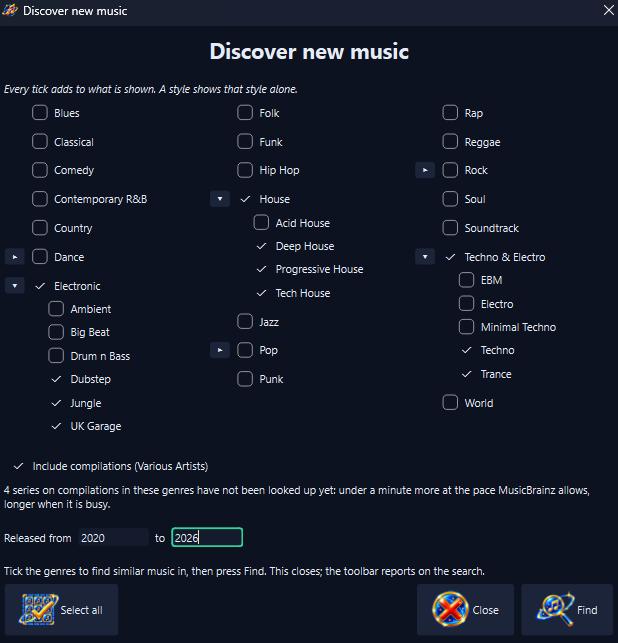
Tick what to look in; add years to be offered music from those alone. Find closes this window; the search then reports from the toolbar.
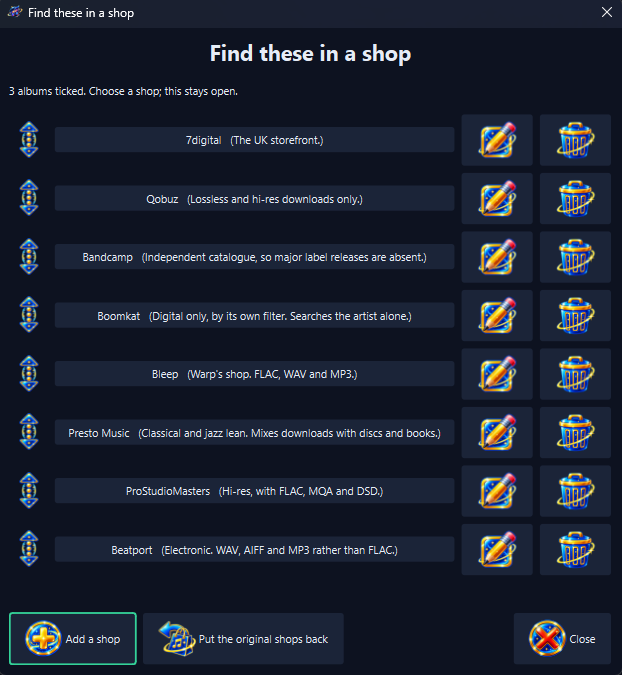
Choosing a shop opens that shop's own search for each ticked album. The window stays open so prices can be compared; the list itself is yours to change.