Choose your music folder once. When you add an album afterwards, press Rescan: Stellody looks only at what has actually changed, so it finishes in a moment rather than reading everything again.
When a scan finishes you get a report rather than a message that vanishes: the new albums by name, how many new tracks came with them, then the totals for your whole collection. Albums that have stopped being found are listed too, since a folder you renamed or moved looks just like one that has gone. A scan that finds nothing new says exactly that.
Stellody trusts how your music is actually filed. Sorting by the labels inside the files was tried and it fell apart on classical music, splitting a single Mozart recording into five different albums. Your folders know better, so your folders decide.
A double album filed as CD1 and CD2, else as Disc 1 and Disc 2, shows up as the one record it really is rather than as two strangers sitting next to each other.
Stellody skips a short, fixed list of folders that operating systems, network drives and version control tools create for themselves. It never guesses that something looks unimportant, because an early version guessed and swallowed two real albums.
A collection built over years is rarely all one format, so Stellody reads the common ones and treats them alike: a folder of MP3s becomes an album exactly as a folder of FLACs does, with the same titles, artists, dates and track numbers read out of whatever each file happens to carry.
Cover art stored inside a FLAC, MP3, WAV, AIFF or M4A file is read too, including the cover an M4A keeps in its own Apple atom. What is left, Monkey's Audio and a handful of rarer formats, is named in the health report rather than quietly skipped.
WMA, WavPack and AAC arrive on a weaker footing than the rest and it is worth saying which. Every other format here was tested against files somebody owns; there were none of those three, so each is proved against a file the test suite encodes for the purpose. WMA and AAC are lossy, so neither states a bit depth; WavPack is lossless and keeps the depth it states.
Albums that shipped a video alongside the songs used to have it left out silently: not a track, not a note in the health report, just absent, so the album quietly held fewer tracks than the disc it came from. Those files now scan as tracks in the albums they belong to and play like any other track, with the controls, the queue and the position bar reaching them exactly as they reach a song.
Every music file carries labels saying what it is: the track name, its number, the album, the artist. On a collection built over years, some of those go wrong. Stellody works out what was probably meant so your album still reads correctly, tells you what looked odd then leaves your file untouched.
The number at the front of the file name wins. Whenever labels have gone wrong, the file names themselves have stayed right.
The folder wins. A person named that folder deliberately; the label inside was written by software. One real folder holds songs claiming to be from three different discs.
The file name wins again. When something rewrites labels in bulk it tends to copy the title across along with the number.
Everything Stellody worked around is written down for you in one place, so you can go and correct it properly in whichever program you like.
Accept the whole list in one press or one album at a time; those corrections then stop being reported every time you start. Changed your mind? Take back one group of files, one whole album or the lot, each in a single press; the findings they answered come back. Your files are untouched either way: the decision is kept in Stellody's own records.
Where a label is simply wrong rather than muddled, state it yourself: the album artist, the title, the date and the genre. What you state is what the album is from then on, over both the labels in the files and anything Stellody would work out for itself.
One track can be put right the same way: its title, artist, disc number or track number, even on an album held as one file with a cue sheet. Nothing is written into a music file; it is kept in Stellody's own records like everything else, so it can be taken back at any time.
Because a stated label is what an album is recognised by, giving one folder the artist and title another already carries makes them one album. That is the way to join a release your collection happens to hold in two places under two spellings. The joined album keeps the rating held against the one it joined.
Read your collection as a tidy list, else browse it as album art in three different sizes. Click a cover and the album opens underneath it with its songs in two columns, taking no more room than they need, so you never lose your place. Click it again to close it.
Move between the list and the covers and you land where you were. Whatever is playing is picked out in the view you arrive at, with its album already open, exactly as though you had got there that way in the first place.
The list shows one row per album, opening to its songs when you press the chevron beside it. One press on the chevron at the left of the Title heading opens all of them; another closes them again. It is instant on a collection of any size.
Open the search box, start typing and your collection narrows with every letter. Close it and everything comes back.
Every song in your collection is searched in a millisecond or two, far faster than you can type. There is nothing to build first and nothing to wait for.
Find one song and its album stays as it always looks, with every other track still around it. The song you were after lights up and flashes so your eye goes straight to it.
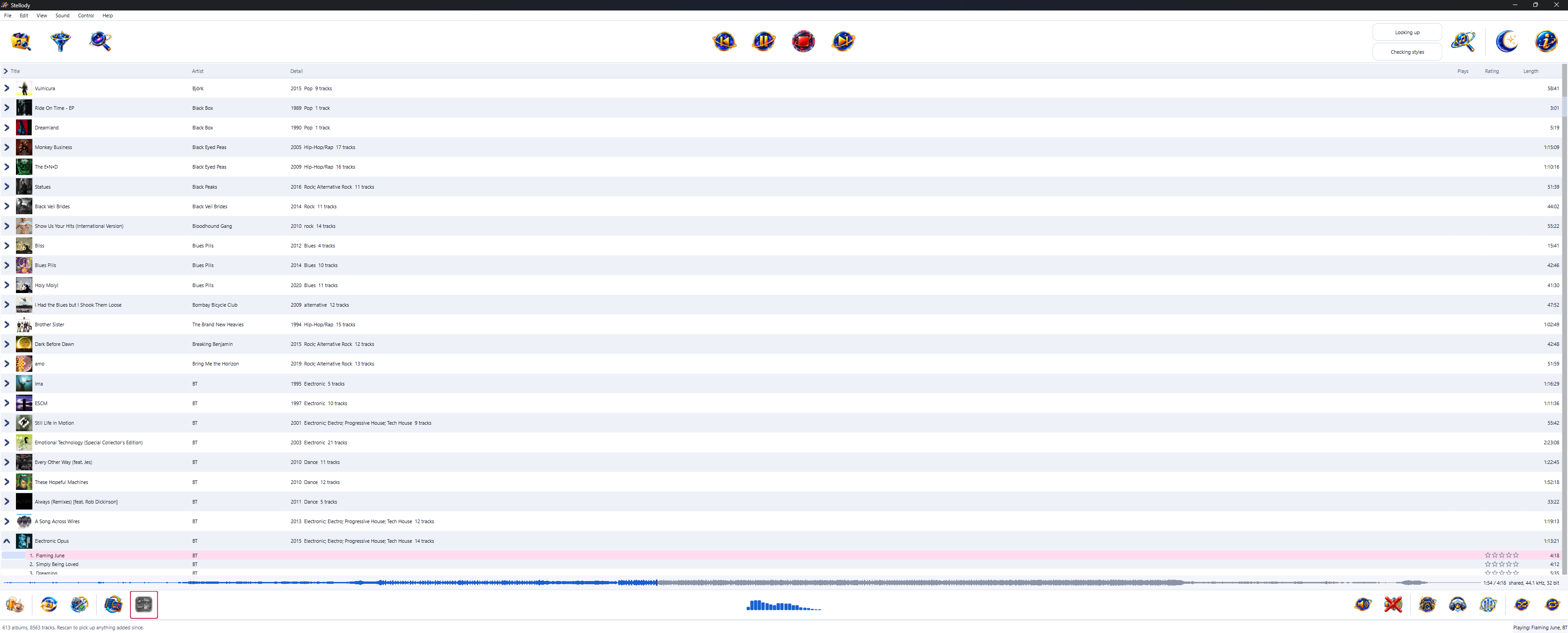
The list view, with the play controls across the top and your settings along the bottom.
Left to itself a collection states dozens of different genre labels, several of them spelling the same idea different ways. Stellody offers a fixed list instead, so what you tick means the same thing every time.
Fifty-seven boxes in all, in alphabetical order. An album can carry several at once. The names follow Discogs' spellings where Discogs has them, so they are ones you have seen before and ones a label written by another program has a chance of matching. Electronic is split into Dance, Electronic, House and Techno & Electro, with styles for the names MusicBrainz gives the artists a search suggests. Each genre's styles fold away behind an arrow, so the list fits a laptop screen; every dialog offering it remembers which you left open.
Asking for Rock and Jazz at once gives you both rather than nothing, so every tick widens what is on screen instead of narrowing it to the albums that somehow answer to everything.
Tick Deep House and you get deep house, not every kind of house. Tick House and you get the lot, deep house included, because Stellody already knows which main each style belongs to.
There is a box for them, because more than a tenth of a real collection states no genre at all and no other tick could ever reach those albums. An album labelled something the list does not carry is in the same box, for the same reason.
A narrowed collection can still be searched and a search can still be narrowed. Neither knows about the other, so the two simply compose.
The stars sit in a Rating column on every song's row, beside its play count, in the list and in the album open under the covers alike. You can read a whole record's ratings at a glance and rate something without listening to it first. Press a star to rate the song; press the star it already sits on to clear the rating. With a song highlighted, the number keys 1 to 5 rate it and 0 clears it.
Set from the stars on the album itself, labelled so you cannot mix the two up. Neither is calculated from the other, because one weak track does not make a bad record.
Skipping through an album adds nothing to your counts, so the numbers mean something. Each song carries its own count on its row, so you can read down an album and see what you keep coming back to.
Rename or move a folder and your stars and counts follow the album rather than getting lost. Neither is ever written into your music files.
Whether the cover sits beside your music as a picture file or is tucked inside the songs themselves, Stellody finds it and remembers it. An album with no artwork gets a plain square rather than an ugly gap.
For an album with no artwork, ask Stellody to go and look. It shows you every cover it found, each labelled with the edition it came from; you pick. It will never quietly attach the wrong sleeve to your favourite record.
Once you have chosen a cover it is yours. Rescanning your collection will not quietly put the old one back.
The public archives Stellody asks are often busy. It tries several times, waiting a little longer each go, then tells you plainly that it could not get an answer rather than pretending your album has no artwork anywhere.